Integrations — channels, delivery & stack Run SMOC on landing pages, iframe embeds, and custom domains; send conversions to Meta, Google Ads, LinkedIn, and ChatGPT ads; connect the HubSpot plugin; and sync outcomes through Zapier, REST API, or MCP. Salesforce is coming soon, and several more are on their way. 


Connect SMOC to channels, surfaces & your stack
Deliver flows on landing pages, website embeds, and LinkedIn; send conversions to Meta, Google Ads, LinkedIn, and ChatGPT ads; connect HubSpot — then route qualified outcomes into the tools your team already uses.
Integrations in one sentence
SMOC connects in two directions: where flows run for prospects, and how outcomes sync back to your stack.
- Delivery — SMOC landing pages, iframe embeds on your site, and custom domains for campaign URLs.
- Paid ads — invoiced companies connect Meta, Google, LinkedIn, and ChatGPT ads in Console. SMOC sends interaction, lead, and Smart Click server-side, and overlays spend on Agents. ChatGPT uses an Ads API key and creates the pixel and three events when the account allows it. Head Tags remain the fallback for PageView on Meta, Google, and LinkedIn.
- LinkedIn & messaging — proactive message flows with full access through the SMOC v2 API.
- CRM — the HubSpot plugin is available. Chosen lists become LinkedIn prospect lists, and leads from the site and LinkedIn sync back. Salesforce is coming soon, and several more are on their way.
- Stack sync — Zapier, REST v2, the Public Contacts API, and MCP for data pipelines and AI clients. Customer keys are read-only by default; writes are opt-in.
Step-by-step guides live at /eguides; common setup questions at /faq. For pricing, see /pricing.
SMOC landing pages
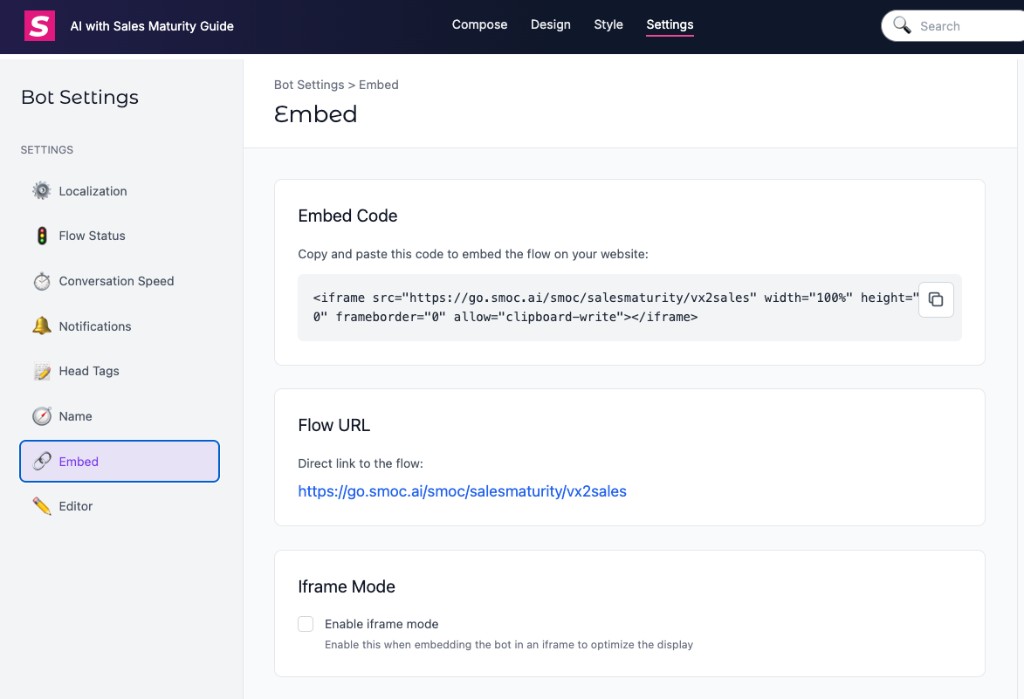
Publish a flow in minutes and copy a campaign-ready link from Studio. Distribute across email, SMS, social, paid ads, and QR codes into the web conversation—add UTM parameters for channel-level tracking, and optionally forward them onto outbound Link Messages. Meta Ads
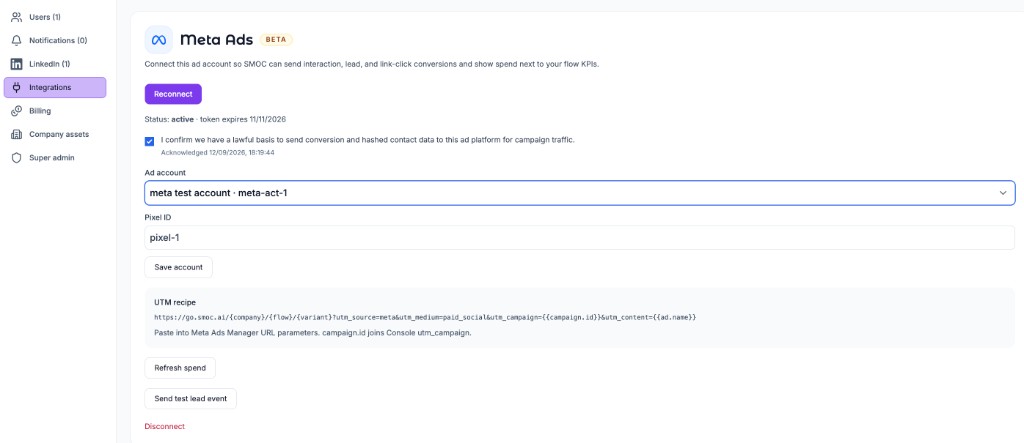
Connect Meta Ads in Console (Beta, invoiced companies). SMOC sends ViewContent, Lead, and Contact (Smart Click) through the Conversions API, and overlays campaign spend on Agents. Paste the URL parameters into each ad’s Tracking field and leave the Website URL as the Flow URL. Keep the pixel in Head Tags for PageView. Engagement campaigns should optimize on ViewContent, not a raw landing-page view. Google Ads
Connect Google Ads in Console (Beta, invoiced companies). SMOC creates SMOC_Interaction, SMOC_Lead, and SMOC_Click and uploads them as click conversions, including for Performance Max. Leave the Final URL as the Flow URL and paste the URL parameters as the Final URL suffix. Paid spend shows on Agents. LinkedIn Ads
Connect LinkedIn Ads in Console (Beta, invoiced companies). SMOC sends SMOC_Interaction, SMOC_Lead, and SMOC_Click through the Conversions API, and overlays campaign spend on Agents. Paste URL tracking parameters on the account or campaign, with the ad set id in utm_id, and leave the destination URL as the Flow URL. This is paid ads into the web flow — not LinkedIn message-flow outreach. ChatGPT / OpenAI
Connect OpenAI ChatGPT ads in Console (Beta, invoiced companies) by pasting an Ads API key. When the account allows it, SMOC creates a web pixel, a Conversions API key, and the events contents_viewed, lead_created, and custom smoc_link_click. If ChatGPT returns 404 or 403, paste the Pixel ID and Conversions API key from Ads Manager. Replace the campaign name and id in the URL parameters. ChatGPT appends oppref. There is no Head Tags pixel. LinkedIn account connection
Connect sender accounts from Console (Sales Launch or Settings → LinkedIn) via hosted LinkedIn login. Optionally enable Sales Navigator, then set daily limits and use Inbox for human-in-the-loop replies. Proactive message flows
Deploy message-style flows inside LinkedIn direct messages — personalized by persona, industry, and signal. The same agent logic extends from ads and landing pages into the inbox. Full v2 API access
Programmatic access to messaging workflows, contact sync, and outcome routing through the SMOC v2 API. Build custom automations or connect messaging data into your CRM and data warehouse. HubSpot
Connect HubSpot and work the people and companies you already keep there. Chosen contact lists become LinkedIn prospect lists. A form on the site, a landing page, or a yes on LinkedIn shows up as a HubSpot contact. Chosen company lists become prospect companies you can search for people. Salesforce
Coming soon
Salesforce is on the same CRM plugin. Connect stays off until it ships. New Contact trigger
Fire a Zap whenever SMOC creates or updates a contact. Select New Contact as the trigger event, test against existing contacts in your account, then map the fields SMOC delivers into your destination app. API key authentication
Generate a key under Settings → Integrations → Zapier and paste it when Zapier prompts for a token — no email or password sign-in. You can optionally name the key and set an expiry. Keys are company-scoped; generating a new one does not revoke existing keys. Revoke unused keys from the issued-keys list on that page. 2,000+ destinations
Route SMOC outcomes into CRMs, spreadsheets, messaging tools, and the rest of your stack through Zapier actions. Access to the SMOC Zapier app is invitation-based — the eGuide has the current setup steps and invite link. Integration token
Generate a key under Settings → Integrations → API in SMOC Console and send it on each request — the same token pattern used for MCP and Zapier. Company-scoped data
Customer keys stay company-scoped and read-only by default. Write-enabled keys may call limited writes including inbox send. Use REST v2 (POST /api/v2/{toolName}) for the same domain tools as MCP, or GET /api/company/mongocontact for the Zapier/compat contacts contract. Flexible integration
Zapier and existing clients keep GET /api/company/mongocontact. New pipelines should call POST /api/v2/{toolName} (Bearer or token). Full call list: /eguides/smoc-rest-v2-reference. OpenAPI is at GET /api/v2/openapi.json. Company-scoped access
Authenticate with an API key from Settings → Integrations → MCP. Keys are confined to your company's contacts, lists, tags, CPCS status, Studio catalog, assets, analytics, inbox, and conversations — never another tenant's data. Default keys are read-only; writes including inbox send are opt-in. AI client support
Connect from Claude Desktop (via mcp-remote), Claude Code, Cursor, VS Code, Windsurf, or other MCP-capable editors. The eGuide covers HTTP config and the local bridge setup for Claude Desktop. Rich data access
Search contacts, prospect lists, and tags; read CPCS and Studio catalog jobs; explore flowcharts and recommendations; pull flow KPIs; and read inbox threads and message-flow conversations. Clients discover the right tool via mcp_capabilities and skills_search — or you can ask in plain language.Related Guides
Continue learning with these related guides
Stay close to the shift in AI sales
Get product updates and perspective on proactive AI agents, multichannel orchestration, and conversion—without the noise.
 Weekly signal on proactive AI sales