01
AI reads the company
Every agent
AI crawls the site and writes the offer, the audience, the voice, and the brand. Website chat, card flows, and LinkedIn start from that.
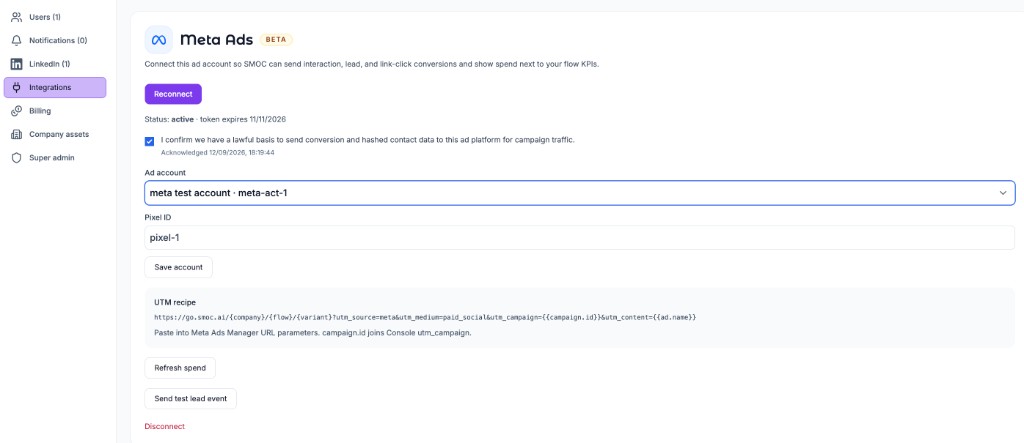
Connect an ad account in Console → Settings → Integrations so SMOC can send server-side conversions from published web flows and overlay paid spend on Agents dashboards.
This integration is Beta. Setup is limited to invoiced companies. Super-admins can open the pages to dogfood. Connecting an account measures conversions and spend. It does not turn a campaign on.
The ad copy is written in Studio. Open the web flow, go to Targeting, and press Generate. That opens ChatGPT, Claude, Grok, or Gemini with a paused-ad brief for Meta, Google, LinkedIn, or ChatGPT Ads. You review it and send it. Full steps: Generate ads from Studio.
Google Ads, LinkedIn Ads, and ChatGPT ads use the same page shape: connect, accept the DPA, then copy the URL parameters. Meta, Google, and LinkedIn connect with OAuth. ChatGPT uses an Ads API key. Where you paste the parameters is different on each platform.
After you connect an account, accept the DPA, and select an ad account:
utm_campaign from SMOC visits (exact match, or the UTM name is a prefix of the Meta name). Put the stable campaign id in utm_id so a rename does not break the join.Head Tags pixels are still useful for PageView / tag load on the landing page. Server upload replaces Google gtag and LinkedIn lintrk step callbacks once that platform is connected. For Meta, only dual-tag in the browser if the fbq event uses the same event_name and eventID ({type}:{conversationId}).
Workspaces that are not invoiced, or that have not connected yet, keep the Head Tags + Custom HTML path.
contents_viewed), SMOC Lead (lead_created), and SMOC Click (custom smoc_link_click) — and does not create a new pixel. A pixel is created only when the account has none. If ChatGPT returns 404 or 403, paste the Pixel ID and Conversions API key from Ads Manager on the same form.?). On Meta, paste them into the ad → Tracking → URL parameters field (or Build a URL parameter). Meta has no account-level UTM setting; use the same string on every ad (or bulk-edit). Do not put those tags in the Website URL on each ad set. On Google, paste them as the Final URL suffix under Settings → Additional settings → Campaign URL options (campaign or account), or on the ad. Leave the Final URL as the Flow URL. On LinkedIn, paste them into URL tracking parameters on the account or campaign, not on the destination URL. On ChatGPT, replace <campaign name> and <campaign id> yourself and paste the string on the ad. ChatGPT appends oppref. Do not add a click-id macro.Accepting the DPA also backfills the last 30 days of stored leads that still look paid, and starts a 90-day spend pull. After that, spend refreshes hourly for the last two days. Use Refresh spend on the same page to pull the last 90 days again.
Interaction, lead, and Smart Click events are on by default. You can turn an event type off on the account if you do not want it uploaded.
Use the published Flow URL as the landing page (https://go.smoc.ai/<company>/<flow>/<variant> or your custom domain).
Use the campaign name in utm_campaign for Console filters and reports when the platform has a name token. Put the id that spend sync stores in utm_id so a rename does not break the join. Meta Insights shows the current campaign name; the UTM name is whatever the campaign was called when the person clicked.
On Meta, open an ad in Ads Manager, scroll to Tracking, and paste the string into URL parameters (no leading ?). Use the same string on every ad — {{campaign.name}}, {{campaign.id}}, and {{ad.name}} fill at click time. Bulk-edit to apply it across ads. Do not put those tags in the Website URL on each ad set. Meta’s help article: Add URL parameters to your Meta ads.
On Google, open the campaign or account, go to Settings → Additional settings → Campaign URL options, and paste the string as the Final URL suffix (or set it on the ad). Leave the Final URL as the Flow URL. Do not put ValueTrack tokens in the Final URL. Google has no campaign-name token, so {campaignid} stays in both utm_campaign and utm_id.
On LinkedIn, open URL tracking parameters on the account or campaign (not the destination URL) and paste the string there. Values are uppercase in double braces. In the current Campaign Manager, {{AD_SET_ID}} is the ad set — the entity LinkedIn’s API still calls a campaign — so that is what spend joins. {{CAMPAIGN_ID}} is the parent campaign; do not put it in utm_id. Leave the destination URL as the Flow URL. LinkedIn’s help article: URL tracking parameters in Campaign Manager.
On ChatGPT, paste the string into the ad’s URL parameters and replace the two placeholders with that campaign’s name and id. ChatGPT has no ValueTrack-style macros for those fields. Leave utm_medium=cpc. ChatGPT appends oppref on the click.
| Platform | Where to paste | Parameters |
|---|---|---|
| Meta | Ad → Tracking → URL parameters | utm_source=meta_{{site_source_name}}&utm_medium=paid_social&utm_campaign={{campaign.name}}&utm_id={{campaign.id}}&utm_content={{ad.name}} |
| Final URL suffix (campaign, account, or ad) | utm_source=google&utm_medium=cpc&utm_campaign={campaignid}&utm_id={campaignid}&utm_content={creative} |
|
| Account or campaign URL tracking parameters | utm_source=linkedin&utm_medium=paid_social&utm_campaign={{AD_SET_NAME}}&utm_id={{AD_SET_ID}}&utm_content={{AD_NAME}} |
|
| ChatGPT | Ad URL parameters. Replace the two placeholders. | utm_source=chatgpt&utm_medium=cpc&utm_campaign=<campaign name>&utm_id=<campaign id> |
utm_medium must stay a paid value (cpc, ppc, paid, paid_social, pmax, display, or paid-social). That, or a Google/Microsoft click id on the URL, is how SMOC decides the visit is paid.
SMOC reads the click IDs the ad platforms already put on the landing URL (gclid, gbraid, wbraid, fbclid, li_fat_id, oppref, and similar), stores them on the conversation, and sends them server-side. It does not read _fbc, _fbp, or _gcl_* cookies.
For Meta, fbclid is sent as fbc. Google needs gclid, gbraid, or wbraid (and drops events older than 90 days). LinkedIn needs li_fat_id or a hashed email. ChatGPT sends oppref with the event and drops events older than 7 days. oppref alone does not mark a visit as paid — the recipe’s utm_medium=cpc does.
If the click never lands with those query params (or a paid utm_medium), the conversion is not enqueued. Organic traffic is skipped.
On a published web flow (not a Studio draft, not a LinkedIn message flow):
| SMOC event | When | Meta | ChatGPT | ||
|---|---|---|---|---|---|
| Interaction | First recorded outgoing interaction | ViewContent |
SMOC_Interaction |
SMOC_Interaction |
contents_viewed |
| Lead | Lead form captured | Lead |
SMOC_Lead |
SMOC_Lead |
lead_created |
| Smart Click | Coupon marked redeemed | Contact |
SMOC_Click |
SMOC_Click |
custom smoc_link_click |
Meta does not create events in Ads Manager. It sends the standard names to the pixel. Google creates conversion actions, and LinkedIn creates conversion rules, the first time an event is uploaded. ChatGPT creates the three event settings on connect. A pasted Pixel ID is reused, and those settings are created on that pixel when ChatGPT returns its conversion source.
Each event is sent at most once per conversation per platform (lead:conversationId, and so on).
Consent: hashed email, phone, IP, and user-agent are included only when marketing consent is granted, or the visitor is outside the EEA/UK/Switzerland and consent was left unspecified. Denied or restricted + unspecified → no enhanced matching. Meta also applies Limited Data Use in those restricted cases.
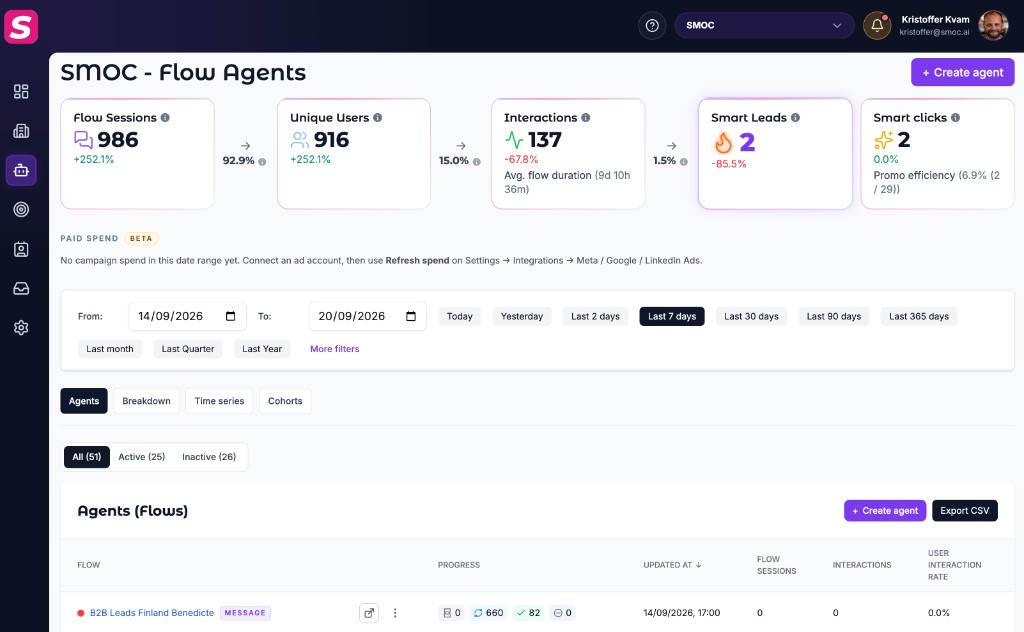
On Console Agents (and the company dashboard when a company is selected), a Paid spend row sits under the KPI cards. Each connected platform with spend in the date range gets its own card.
utm_campaign from SMOC visits (plus the Campaign filter if one is set). Matching is case-insensitive, and a UTM name also matches a Meta campaign title that adds a suffix (for example Retrade Smoc Selgere matches Retrade Smoc Selgere - View Content).Hourly sync covers today and the previous two days. If a new campaign is missing, use Refresh spend on the integration page (last 90 days). Agents defaults to the last seven days, so older spend only appears if you widen the date range.
fbclid, gclid, li_fat_id, or oppref).If the OAuth token expires, admins get a Reconnect notice in the Console notification center (the bell). Open it to return to Settings and reconnect. Google and LinkedIn access tokens refresh automatically; Meta (and a failed refresh) needs a new Connect. ChatGPT does not use OAuth. Paste a new Ads API key with Connect if you rotate it. New conversions and spend sync pause until the connection is active again.
Where AI runs
Website chat, card flows, and LinkedIn share one system. AI does each job below. The line under the title says where that job runs.
Every agent
AI crawls the site and writes the offer, the audience, the voice, and the brand. Website chat, card flows, and LinkedIn start from that.
Dashboard · Lead Strategy
Set your lead goal. AI simulates thousands of channel mixes, ranks them by efficiency, and shows the most cost-effective plan. Your data and constraints shape the math.
Every agent · theme on web · list on LinkedIn
AI writes the flow. Theme runs on website chat and cards. Translation runs on every agent. AI finds the prospect list on LinkedIn.
Path on every flow · web and LinkedIn split
Reinforcement learning on the flow path runs on every agent. Recommendations run on web. Right timing and reply reading run on LinkedIn.
Every agent
AI proposes a variant, uses your review on the next draft, and starts from an example that already works. You apply the change.
Continue learning with these related guides
Get product updates and perspective on proactive AI agents, multichannel orchestration, and conversion—without the noise.
 Weekly signal on proactive AI sales
 Enter your email below to get started with SMOC.AI