01
AI reads the company
Every agent
AI crawls the site and writes the offer, the audience, the voice, and the brand. Website chat, card flows, and LinkedIn start from that.
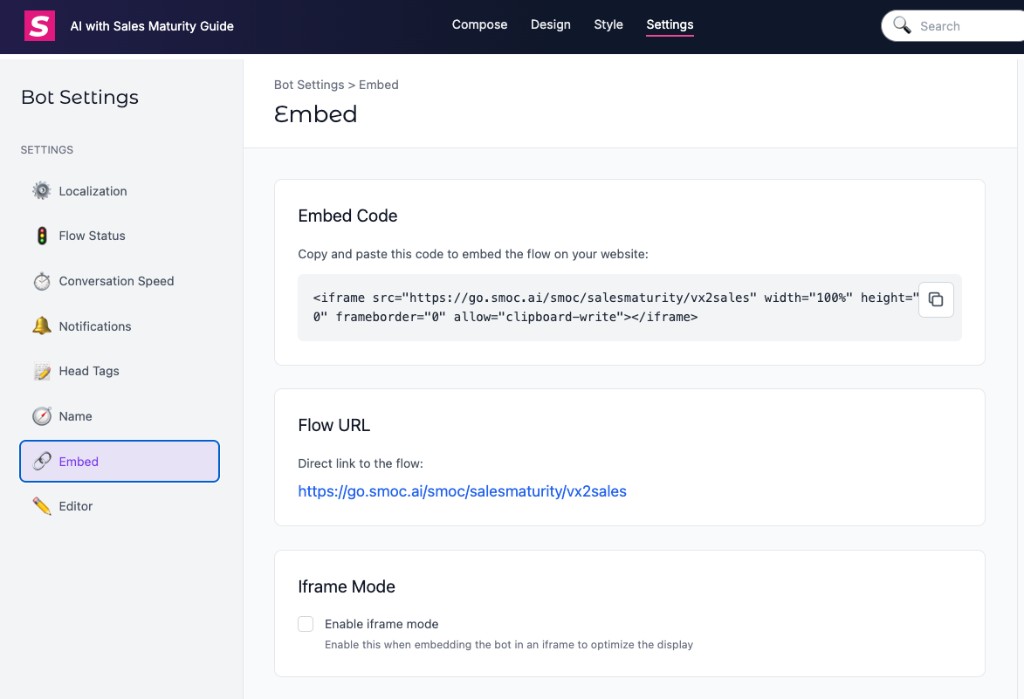
Point paid traffic at a SMOC landing page, then send interaction, lead, and link-click events back to the ad platforms so campaigns can optimize.
Invoiced companies should connect the ad account in Console instead of wiring every funnel step in Head Tags. Copy the URL parameters from that page: Meta goes in each ad’s Tracking → URL parameters, Google goes in the Final URL suffix, and LinkedIn goes in account or campaign URL tracking parameters ({{AD_SET_ID}}, not {{CAMPAIGN_ID}}). Full setup, click IDs, spend on Agents, and what fires automatically: Connect Meta, Google, and LinkedIn Ads.
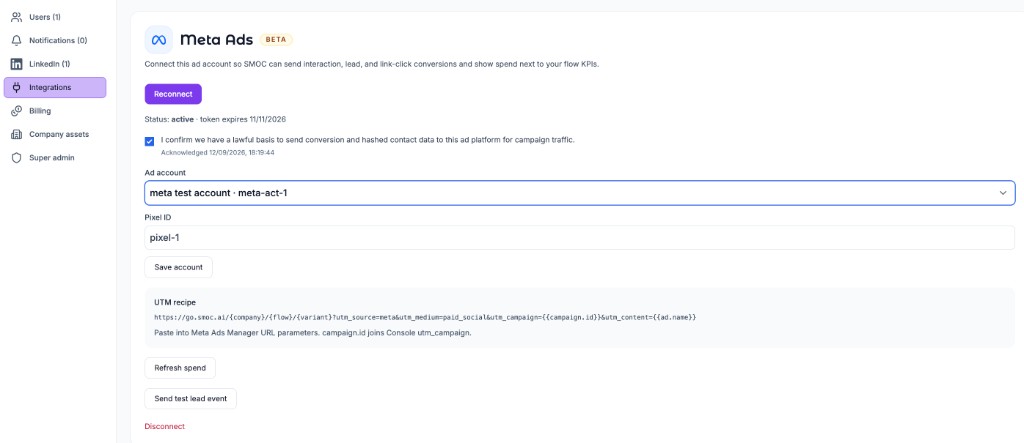
After you connect and accept the DPA:
gtag / lintrk calls.fbq event uses the same event_name and eventID ({type}:{conversationId}). Mismatched IDs create duplicates.This page is the Head Tags + Custom HTML path — for workspaces that are not invoiced yet, or that have not connected an ads integration. Existing pixels and Firehose KPIs stay unchanged.
Use this for:
If the workspace is not invoiced, or you have not connected an ads integration yet, pixels and callback functions live in Studio → Settings → Head Tags, and each funnel step fires a callback from a Custom HTML element (Studio labels this HTML Script) with an empty image and onerror.
report_conversion_interaction().Conversation HTML is injected into the page. A <script> inside a message is not a reliable place to load pixels. Head Tags run in the document <head> on every visit. The empty-image callback is how a specific step triggers a conversion without waiting for a page reload.
In Studio open the web flow → Settings → Head Tags. Paste the platform snippets, then the callback functions. Replace the placeholder IDs with values from Meta Events Manager, Google Ads (Tools → Conversions), and LinkedIn Campaign Manager (Analyze → Conversion tracking).
Include the Google gtag.js loader. Defining gtag() alone queues events; the loader actually sends them.
<!-- Google Ads (required for Performance Max conversion actions) -->
<script async src="https://www.googletagmanager.com/gtag/js?id=AW-XXXXXXXXXX"></script>
<script>
  window.dataLayer = window.dataLayer || [];
  function gtag(){dataLayer.push(arguments);}
  gtag('js', new Date());
  gtag('config', 'AW-XXXXXXXXXX');
</script>

<!-- Meta Pixel -->
<script>
!function(f,b,e,v,n,t,s)
{if(f.fbq)return;n=f.fbq=function(){n.callMethod?
n.callMethod.apply(n,arguments):n.queue.push(arguments)};
if(!f._fbq)f._fbq=n;n.push=n;n.loaded=!0;n.version='2.0';
n.queue=[];t=b.createElement(e);t.async=!0;
t.src=v;s=b.getElementsByTagName(e)[0];
s.parentNode.insertBefore(t,s)}(window, document,'script',
'https://connect.facebook.net/en_US/fbevents.js');
fbq('init', 'YOUR_META_PIXEL_ID');
fbq('track', 'PageView');
</script>
<noscript><img height="1" width="1" style="display:none"
src="https://www.facebook.com/tr?id=YOUR_META_PIXEL_ID&ev=PageView&noscript=1"
/></noscript>

<!-- LinkedIn Insight Tag -->
<script type="text/javascript">
_linkedin_partner_id = "YOUR_LINKEDIN_PARTNER_ID";
window._linkedin_data_partner_ids = window._linkedin_data_partner_ids || [];
window._linkedin_data_partner_ids.push(_linkedin_partner_id);
</script>
<script type="text/javascript">
(function(l) {
if (!l){window.lintrk = function(a,b){window.lintrk.q.push([a,b])};
window.lintrk.q=[]}
var s = document.getElementsByTagName("script")[0];
var b = document.createElement("script");
b.type = "text/javascript";b.async = true;
b.src = "https://snap.licdn.com/li.lms-analytics/insight.min.js";
s.parentNode.insertBefore(b, s);})(window.lintrk);
</script>
<noscript>
<img height="1" width="1" style="display:none;" alt=""
src="https://px.ads.linkedin.com/collect/?pid=YOUR_LINKEDIN_PARTNER_ID&fmt=gif" />
</noscript>

<script>
function report_conversion_interaction() {
  gtag('event', 'conversion', { 'send_to': 'AW-XXXXXXXXXX/INTERACTION_LABEL' });
  fbq('track', 'ViewContent');
  window.lintrk('track', { conversion_id: LINKEDIN_INTERACTION_CONVERSION_ID });
}

function report_conversion_qualified() {
  gtag('event', 'conversion', { 'send_to': 'AW-XXXXXXXXXX/QUALIFIED_LABEL' });
  fbq('track', 'CustomizeProduct');
  window.lintrk('track', { conversion_id: LINKEDIN_QUALIFIED_CONVERSION_ID });
}

function report_conversion_lead_captured() {
  gtag('event', 'conversion', { 'send_to': 'AW-XXXXXXXXXX/LEAD_LABEL' });
  fbq('track', 'Lead');
  window.lintrk('track', { conversion_id: LINKEDIN_LEAD_CONVERSION_ID });
}
</script>
Publish the flow after saving Head Tags.
PageView / tag load fires when someone opens the landing page. Lead and other funnel events must not fire on load — only when the matching Custom HTML node is shown.
On the node that represents that funnel step, add a Custom HTML element (picker category Content, field label HTML Script) and paste:
<img src="" onerror="report_conversion_interaction()" style="display:none">
Use the matching function on later nodes:
<img src="" onerror="report_conversion_qualified()" style="display:none">
<img src="" onerror="report_conversion_lead_captured()" style="display:none">
An empty src fails to load, so the browser runs onerror and calls the Head Tags function. You can keep visible copy in the same HTML:
<p>Great — a few questions so we can help.</p>
<img src="" onerror="report_conversion_interaction()" style="display:none">
Typical mapping:
| Flow step | Callback | Meta | Google Ads | |
|---|---|---|---|---|
| Visitor starts talking (first meaningful reply) | report_conversion_interaction |
ViewContent |
Interaction conversion | Interaction conversion ID |
| Qualified (answered your filter questions) | report_conversion_qualified |
CustomizeProduct |
Qualified conversion | Qualified conversion ID |
| Contact captured | report_conversion_lead_captured |
Lead |
Lead conversion | Lead conversion ID |
Place the lead callback on the thank-you / confirmation node after the form is submitted, not on the form itself.
If Meta Ads is connected in Console, point the ad Website URL at the Flow URL and paste the URL parameters into each ad’s Tracking field. Keep the pixel in Head Tags for PageView. If you have not connected, confirm the pixel and standard events in Events Manager and put UTMs on the Flow URL yourself.
For engagement campaigns, optimize toward ViewContent (or a custom event you fire from report_conversion_interaction). That event means the visitor actually started the conversation — stronger than a landing-page view.
For lead-gen / conversion campaigns, set Lead as the optimization event and keep ViewContent as an upper-funnel signal. Do not optimize a lead campaign on PageView.
In Google Ads create one conversion action per callback (Tools → Conversions → New conversion action → Website). Use the event snippet send_to value (AW-XXXXXXXXXX/LABEL) in the matching gtag('event', 'conversion', …) call.
Performance Max needs conversion actions to bid. A usual setup:
report_conversion_lead_captured)If Google Ads is connected in Console, set the asset-group Final URL to the Flow URL and paste the URL parameters from Settings → Integrations as the Final URL suffix. If you have not connected, append UTMs on that final URL (utm_source=google, utm_medium=pmax or cpc, and {campaignid} in utm_campaign and utm_id).
Enhanced conversions and consent mode are configured in Google Ads / gtag — SMOC does not replace that setup. If you already load everything through GTM in Head Tags, you can fire the same events from GTM instead of inline gtag calls; the Custom HTML callbacks still need functions that GTM or dataLayer.push can see.
In Campaign Manager create website conversions (Insight Tag already on the page). Each conversion has a numeric conversion ID. Pass that ID to window.lintrk('track', { conversion_id: … }).
Use those conversions on website conversion or conversation ad objectives. If LinkedIn Ads is connected in Console, point the destination URL at the Flow URL and paste account or campaign URL tracking parameters ({{AD_SET_ID}} in utm_id). If you have not connected, point the ad at the Flow URL and fire lintrk from the flow. Optimize on the lead conversion; keep the interaction conversion as an early signal, the same way Meta uses ViewContent.
LinkedIn conversion ads are paid LinkedIn ads that send people to the web flow. They are not the same as SMOC LinkedIn message flows (outbound DMs from a connected sender). Message-flow setup is in Connecting to SMOC LinkedIn Agent.
For ads, the SMOC-hosted landing page is the straightforward destination: Head Tags on that flow are the page the visitor actually loads.
If you embed the flow in an iframe on your own domain, parent-page pixels see the outer page, not conversation steps. Keep Head Tags and Custom HTML callbacks on the flow so conversions still fire when the agent reaches a node. Pass UTMs into the iframe with smoc.js as in that guide.
To send those same campaign parameters on to a shop or partner URL from a Link Message, enable Forward UTM & click IDs on the link. See Embedding web flows and passing UTMs.
lintrk track — not before.Where AI runs
Website chat, card flows, and LinkedIn share one system. AI does each job below. The line under the title says where that job runs.
Every agent
AI crawls the site and writes the offer, the audience, the voice, and the brand. Website chat, card flows, and LinkedIn start from that.
Every agent · theme on web · list on LinkedIn
AI writes the flow. Theme runs on website chat and cards. Translation runs on every agent. AI finds the prospect list on LinkedIn.
Path on every flow · web and LinkedIn split
Reinforcement learning on the flow path runs on every agent. Recommendations run on web. Right timing and reply reading run on LinkedIn.
Every agent
AI proposes a variant, uses your review on the next draft, and starts from an example that already works. You apply the change.
Continue learning with these related guides
Get product updates and perspective on proactive AI agents, multichannel orchestration, and conversion—without the noise.
 Weekly signal on proactive AI sales
 Enter your email below to get started with SMOC.AI