01
AI reads the company
Every agent
AI crawls the site and writes the offer, the audience, the voice, and the brand. Website chat, card flows, and LinkedIn start from that.
Simple guide showing how to connect SMOC customer and outcome data to your CRM, data warehouse, or custom systems.
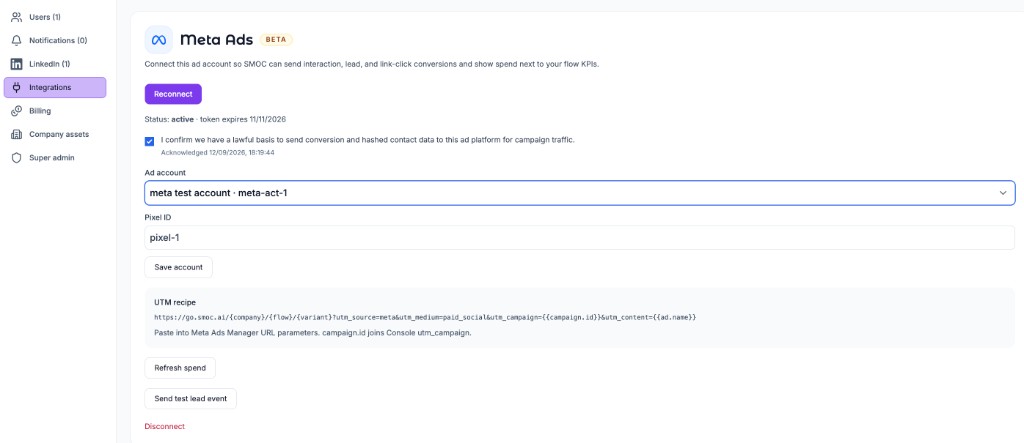
All SMOC data integrations authenticate with a private API key generated in Console — the same pattern as Zapier and MCP.
For the REST API:
For MCP:
Your key is tied to your company. Every request made with it is automatically scoped to your data — you only see contacts, companies, and analytics that belong to you.
SMOC supports several ways to move data out of the platform:
Send your integration key on each request to SMOC public REST endpoints. Typical use cases include:
All responses stay company-scoped — you never see another tenant's data.
For endpoint details and examples, follow the steps in this guide and the related eGuides at smoc.ai/eguides. For a product overview of all integration paths, see smoc.ai/integrations.
POST /api/v2/{toolName} callWhere AI runs
Website chat, card flows, and LinkedIn share one system. AI does each job below. The line under the title says where that job runs.
Every agent
AI crawls the site and writes the offer, the audience, the voice, and the brand. Website chat, card flows, and LinkedIn start from that.
Dashboard · Lead Strategy
Set your lead goal. AI simulates thousands of channel mixes, ranks them by efficiency, and shows the most cost-effective plan. Your data and constraints shape the math.
Every agent · theme on web · list on LinkedIn
AI writes the flow. Theme runs on website chat and cards. Translation runs on every agent. AI finds the prospect list on LinkedIn.
Path on every flow · web and LinkedIn split
Reinforcement learning on the flow path runs on every agent. Recommendations run on web. Right timing and reply reading run on LinkedIn.
Every agent
AI proposes a variant, uses your review on the next draft, and starts from an example that already works. You apply the change.
Continue learning with these related guides
Get product updates and perspective on proactive AI agents, multichannel orchestration, and conversion—without the noise.
 Weekly signal on proactive AI sales
 Enter your email below to get started with SMOC.AI