01
AI reads the company
Every agent
AI crawls the site and writes the offer, the audience, the voice, and the brand. Website chat, card flows, and LinkedIn start from that.
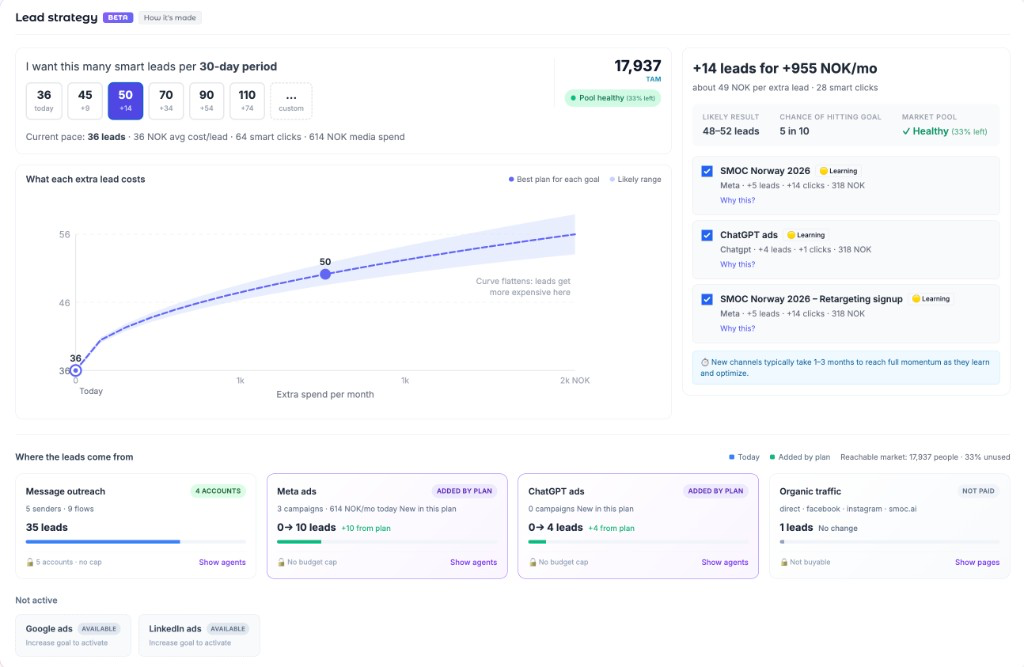
Lead Strategy helps you reach your lead goals by analyzing your current channels and recommending the most cost-effective growth tactics. Open it from the Dashboard under Lead Strategy.
Learns from your data: It looks at your historical performance across LinkedIn outreach, paid ads, and organic traffic to understand what's working.
Falls back to benchmarks: When you don't have enough historical data for a channel, it uses SMOC's aggregated performance data and industry benchmarks to estimate results.
Simulates growth paths: The system runs thousands of scenarios, testing different combinations of tactics (adding LinkedIn seats, increasing ad spend, launching new campaigns) to find the best mix.
Ranks by efficiency: Recommendations are sorted by cost-per-lead, so you always see the most efficient options first.
Adapts to constraints: It respects your real limits — available LinkedIn accounts, budget caps, and market size — so the plan is actually achievable.
At the top of the Lead Strategy section, set how many smart leads you want per 30-day period:
In the dashboard example, the target is 50 leads per month. The plan adds 14 leads for 955 NOK per month. The likely result is 48–52 leads, with a 5-in-10 chance of hitting 50.
The "What each extra lead costs" chart shows how cost changes as you add more leads:
The curve typically flattens or rises as leads get more expensive — your cheapest tactics fill first, then pricier ones kick in.
The recommendation panel on the right shows:
| Element | What it means |
|---|---|
| +X leads for +Y NOK/mo | Total extra leads and the monthly cost to achieve them. For a target of 50, the example plan is +14 leads for +955 NOK/mo. |
| about Z NOK per extra lead | Average cost per additional lead in this plan. The example is about 49 NOK per extra lead. |
| Likely result | The range of leads you'll probably land in. For a target of 50, that range is 48–52 leads. |
| Chance of hitting goal | A probability rating. The example is 5 in 10. |
| Market pool | Health of your addressable market: Healthy, Depleting, or Critical. |
Below the headline, each tactic appears as a row you can check or uncheck:
Uncheck a tactic to remove it from the plan. The totals recalculate immediately.
The TAM (Total Addressable Market) number shows how many people you can realistically reach. The Pool health badge indicates:
Start realistic: Begin with a modest increase over current pace. Small steps compound.
Watch the curve: When the cost curve flattens sharply, you're hitting diminishing returns. Consider whether the extra cost is worth it.
Respect ramp-up: New channels take 1–3 months to reach full potential. The plan accounts for this, but patience helps.
Revisit monthly: As channels mature and data accumulates, plans get more accurate. Check back each period.
Use constraints: If you can't add a LinkedIn seat this month, uncheck it. The plan adapts.
Q: Why does Lead Strategy recommend LinkedIn when I haven't connected accounts?
A: The system shows the most efficient paths. If LinkedIn outreach is cost-effective, it will suggest it. You can uncheck or connect under Settings → LinkedIn.
Q: How accurate is the "chance of hitting goal"?
A: It's based on simulation — thousands of randomized scenarios using your data or benchmarks. Real results depend on execution, market conditions, and some luck.
Q: What if my goal exceeds TAM?
A: Lead Strategy will flag this and suggest expanding — new markets, broader ICP, or additional channels.
Q: Is this the same as a media agency?
A: It does similar planning work — analyzing options, projecting costs, recommending a mix — but automated and always up to date.
Where AI runs
Website chat, card flows, and LinkedIn share one system. AI does each job below. The line under the title says where that job runs.
Every agent
AI crawls the site and writes the offer, the audience, the voice, and the brand. Website chat, card flows, and LinkedIn start from that.
Dashboard · Lead Strategy
Set your lead goal. AI simulates thousands of channel mixes, ranks them by efficiency, and shows the most cost-effective plan. Your data and constraints shape the math.
Every agent · theme on web · list on LinkedIn
AI writes the flow. Theme runs on website chat and cards. Translation runs on every agent. AI finds the prospect list on LinkedIn.
Path on every flow · web and LinkedIn split
Reinforcement learning on the flow path runs on every agent. Recommendations run on web. Right timing and reply reading run on LinkedIn.
Every agent
AI proposes a variant, uses your review on the next draft, and starts from an example that already works. You apply the change.
Continue learning with these related guides
Get product updates and perspective on proactive AI agents, multichannel orchestration, and conversion—without the noise.
 Weekly signal on proactive AI sales
 Enter your email below to get started with SMOC.AI